You get used to a certain sound and feel when your brush cutter is working through grass and weeds. However, that familiar whir can quickly turn into a harsh rattle or an unexpected shake. Unusual vibration is easy to ignore when you are busy working, but it can signal a problem or create a safety hazard.
Is the vibration normal, or is your brush cutter telling you something is wrong? Some vibration is expected during operation, but sudden or excessive shaking is a reason to stop cutting. This guide will help you identify the possible causes, check the blade and mounting assembly, and determine what to do if the vibration continues.

Table of Contents
- What Causes Brush Cutter Blade Vibration?
- How Do You Check and Fix a Vibrating Brush Cutter Blade?
- What If the Blade Still Vibrates After These Checks?
What Causes Brush Cutter Blade Vibration?
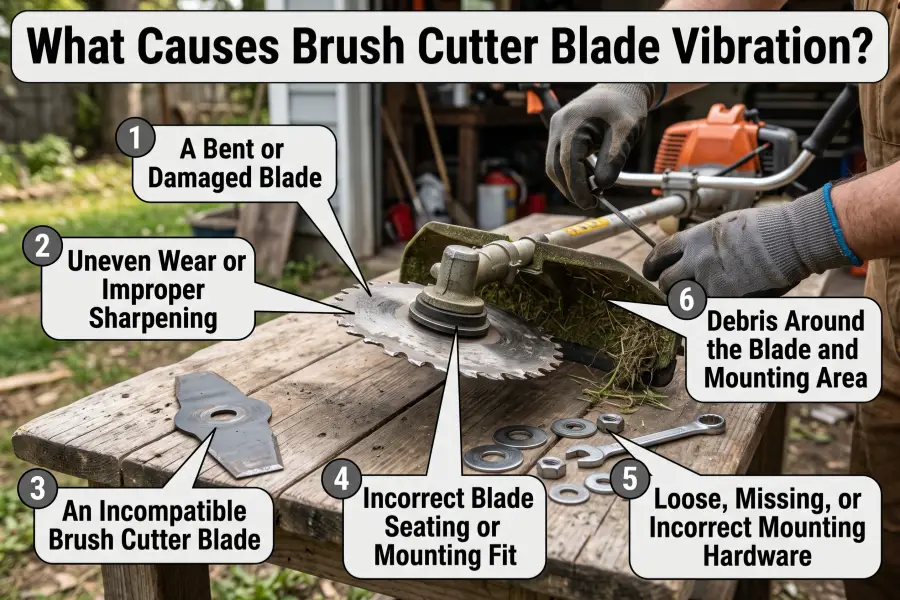
Abnormal brush cutter blade vibration can result from a damaged or unbalanced blade, an unsuitable replacement, incorrect seating, loose mounting hardware, or debris interfering with the cutting attachment. If the blade and mounting assembly are sound, the vibration may come from worn or damaged machine components instead.
Vibration will not point you directly to the source. But once you understand the likely causes, you can narrow your focus instead of assuming the blade needs replacing.
A Bent or Damaged Blade
A bent blade, broken tooth, or missing piece of metal can disturb the blade’s rotation and cause vibration. Something as simple as striking a rock or another hard object can do it.
The blade is an obvious place to start troubleshooting. Some damage is easy to spot, but a slight bend may take a closer look. Cracks and damage around the center hole also need attention, whether or not they explain the shaking. That area helps locate and secure the blade on the machine.
A blade does not have to stop cutting to have a problem. Getting through another patch of weeds does not tell you whether it is still sound.
Uneven Wear or Improper Sharpening
Uneven wear can affect blade balance when it removes more material from one area than another. Sharpening can create the same problem if one cutting edge is ground back much further than the others.
The blade may feel sharp afterward and still vibrate when it spins. Restoring the edge also means preserving the blade’s shape and balance, using the sharpening method appropriate for its design.
A dull edge alone does not prove the blade is unbalanced. Dullness can increase cutting resistance, while uneven material removal changes how weight is distributed around the blade.
An Incompatible Brush Cutter Blade
A replacement blade can fit onto the mounting point without being suitable for the brush cutter. Its type, dimensions, mounting requirements, and rated speed must be compatible with the machine.
This is worth considering if the shaking began after fitting a replacement. Checking the center hole alone is not enough. A blade outside the machine’s permitted specifications may create clearance, mounting, or operating problems.
An unsuitable blade will not necessarily vibrate. The absence of shaking is therefore not proof that a replacement is safe to use.

Incorrect Blade Seating or Mounting Fit
A compatible blade can still vibrate if it is not centered or seated correctly. The center hole must engage the locating feature properly, and the blade must sit evenly against its mounting surfaces.
Your blade doesn’t have to be damaged to cause trouble. A new, perfectly good blade can shake if it is caught on the edge of the locating boss or clamped before it has settled into position.
This can be a likely culprit if the shaking began immediately after installation. Sometimes the blade looks secure but is not sitting where it is supposed to.
Loose, Missing, or Incorrect Mounting Hardware
Loose hardware can allow movement in the cutting attachment. A missing washer or adapter can alter the fit, while an incorrect retaining part can prevent the blade from being clamped properly.
The blade relies on the correct combination of mounting parts to remain secured and centered. A small component can be easy to overlook during a blade change, especially when the rest of the assembly appears to go back together normally.
Do not substitute a missing washer or adapter with one that “just happens to fit.” The parts and their arrangement matter as much as tightening them.
Debris Around the Blade and Mounting Area
Grass or vines wrapped around the cutting attachment can interfere with rotation. Debris trapped between mounting surfaces can also prevent the blade from seating properly.
Cutting does not always leave the area clean. Grass can collect around the head, while dirt and plant residue can remain on mounting surfaces. During a blade change, some of that debris may end up between parts that should sit directly against each other.
A little dirt does not automatically make the blade unbalanced. The concern is buildup that interferes with movement or changes how the assembly fits together.
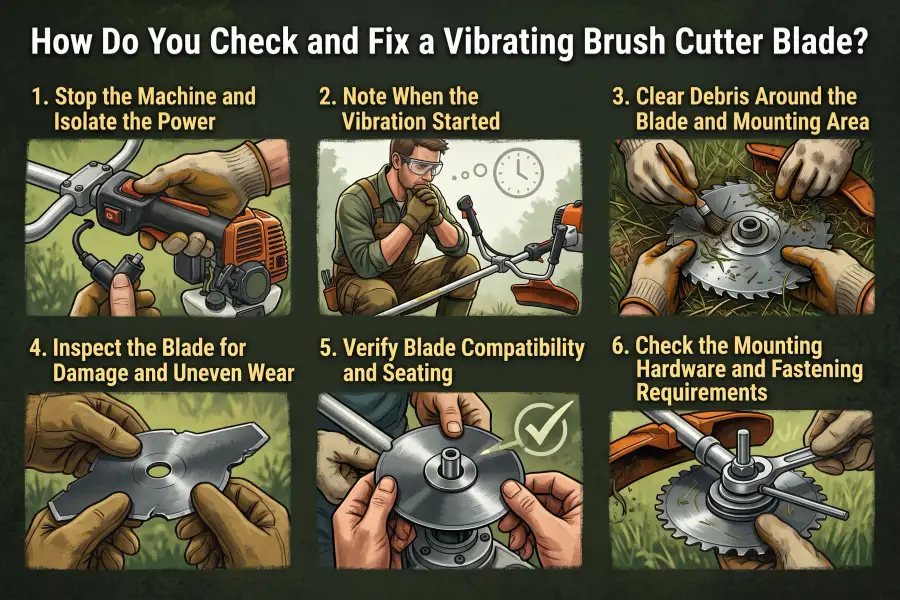
How Do You Check and Fix a Vibrating Brush Cutter Blade?
Stop the machine and prevent accidental starting before inspecting a vibrating brush cutter blade. Then clear debris, inspect the blade, and check its compatibility, seating, and mounting hardware. Correct the problem you find before returning the machine to use.
Check the easy stuff first. You may find something straightforward, but don’t keep running the machine to see whether the shaking settles down.
1. Stop the Machine and Isolate the Power
If your brush cutter starts vibrating excessively while you are operating it, stop cutting immediately. Switch off the engine or motor and wait for the blade and other moving parts to stop completely.
Then follow the manual’s procedure for preventing accidental starting. Remove the battery on a battery-powered model or unplug a corded model. On a gas-powered brush cutter, this typically involves disconnecting the spark plug cap or boot, rather than removing the spark plug itself.
Set the machine down securely and wear protective gloves when handling the blade. Never inspect, touch, or adjust the cutting attachment while it is still moving.
2. Note When the Vibration Started
Think about what happened just before the shaking began. A recent blade change points you toward compatibility, seating, and mounting hardware. An impact makes damage an important place to look. If the vibration appeared after sharpening, uneven material removal is worth checking.
Use what you already noticed to guide the inspection. You don’t need to restart the machine to recreate the problem.
3. Clear Debris Around the Blade and Mounting Area
Remove accessible grass, vines, and other buildup using the cleaning procedure for your machine.
If the blade needs to come off, follow the prescribed removal procedure and keep track of the mounting parts. Clean the exposed contact surfaces before reassembly. This also makes it easier to spot damage that dirt or clippings may have hidden.
4. Inspect the Blade for Damage and Uneven Wear
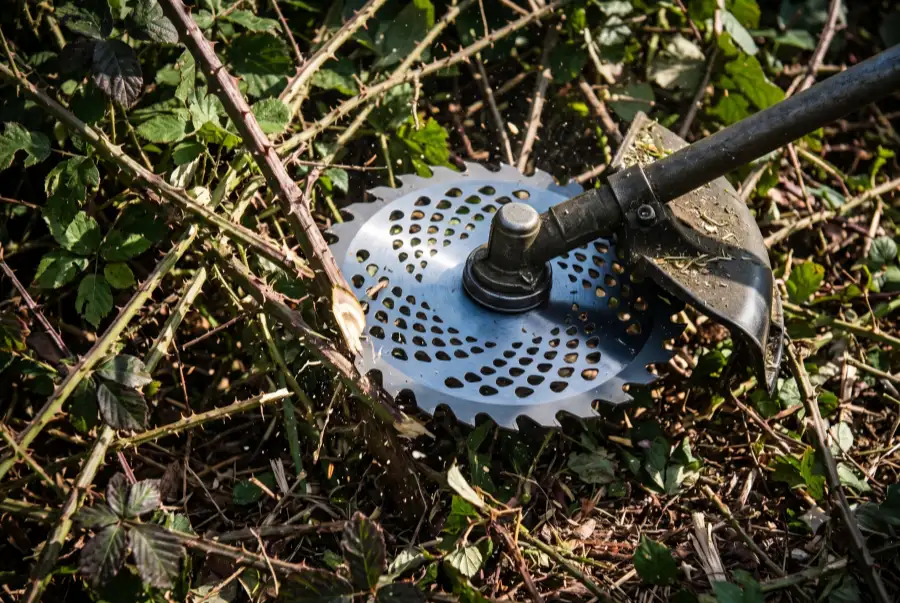
Look over the blade body, cutting edges or teeth, and center hole. Check for cracks, bends, broken or missing teeth, and damage that could affect secure mounting. Look for edges or sections that have worn or been ground back noticeably more than the others.
Next, don’t mistake a dull blade for a damaged one. A dull but otherwise sound blade may be suitable for sharpening if its manufacturer permits it. You cannot sharpen away a crack or restore a damaged mounting hole. Take a structurally damaged blade out of service.
Our guide on when to replace a brush cutter blade explains the distinction. If the blade is simply dull, see how to sharpen a brush cutter blade.
If uneven sharpening appears to be the problem, use the balance-checking method specified for the blade or have it assessed by a suitable service professional. Don’t keep grinding one side by eye in the hope of making it run smoothly.
5. Verify Blade Compatibility and Seating
Compare the blade with the permitted attachments in your machine’s instructions. Check its type and dimensions, the required mounting arrangement, and whether its speed rating is suitable. Confirm any required guard and other equipment for that attachment as well.
Then look at how the blade is sitting. Is the center hole properly engaged with the locating feature? Is the blade resting evenly against the mounting surface?
If the blade is suitable but incorrectly seated, reinstall it using the prescribed arrangement. Do not enlarge a mounting hole or improvise an adapter to force an unsuitable blade into place.
6. Check the Mounting Hardware and Fastening Requirements
Look for anything loose, damaged, out of place, or missing. Compare the assembly with the mounting diagram, including the order and orientation of its parts.
Secure it using the fastening procedure for your model. Thread direction and tightening requirements can differ between machines, so “tighten it as hard as possible” is not a reliable fix.
Replace worn or damaged parts with the correct components. Before returning the machine to operation, complete the checks specified in the manual. If the blade cannot be securely and correctly mounted, do not restart the machine.
What If the Blade Still Vibrates After These Checks?
If the blade is suitable, undamaged, and correctly mounted but abnormal vibration continues, the cause may be elsewhere in the machine. Depending on its design, the shaft assembly, bearings, or gearbox may need inspection. Stop using the brush cutter rather than repeatedly changing blades.
Wear or damage in the drivetrain can allow unwanted movement or affect smooth rotation. These problems may not be visible during a check of the blade and its mounting parts. An unfamiliar grinding or rattling sound is useful information, but it does not identify the faulty component on its own.
Have a suitable service professional inspect the machine rather than tearing into the drivetrain without knowing what to look for. Tell them when the shaking began, whether the blade was recently changed or sharpened, and whether the machine struck anything.
The key is to find the cause before using the brush cutter again. A blade that looks fine does not rule out a mounting problem or an issue inside the machine. If you cannot identify and safely correct the source of the vibration, keep the machine out of service until it has been checked.