You’ve replaced your circular saw blade, expecting smoother, cleaner cuts, but dark burn marks still appear on the wood. So what’s going wrong? A new blade doesn’t always solve the problem, especially when the cause lies elsewhere in the cutting process.
Before buying another blade, it helps to understand what might be causing the burning and what to check first. This guide walks you through the most likely causes and how to address them.
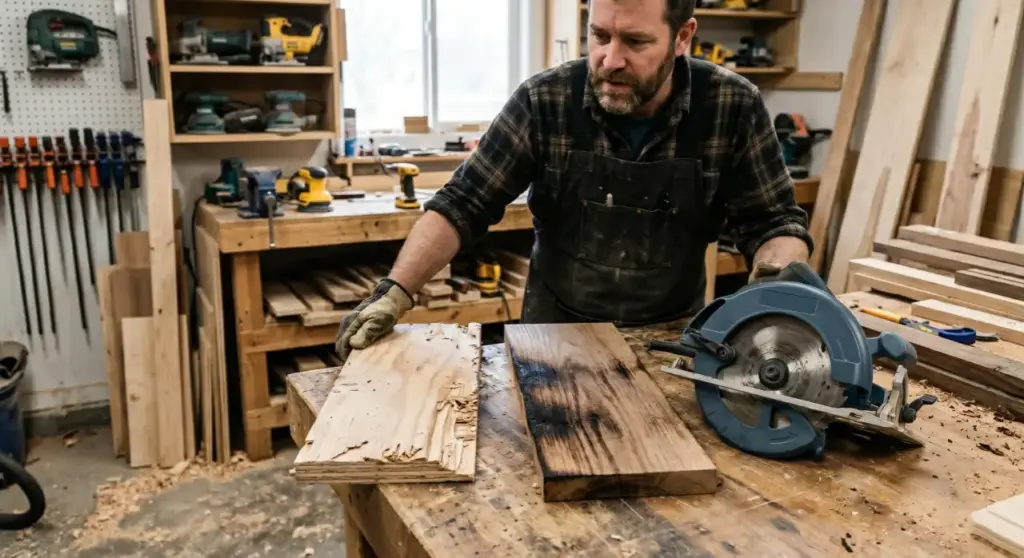
Table of Contents
- What Can the Burn Marks Tell You?
- Is the New Blade Installed Correctly and Undamaged?
- Is the New Blade Right for the Cut?
- Are You Pausing or Forcing the Cut?
- Is the Blade Rubbing Against the Side of the Cut?
- Is the Wood Pinching the Blade?
- When Should You Stop Cutting and Get the Saw Checked?
- Conclusion
- FAQs About Circular Saw Burn Marks
What Can the Burn Marks Tell You?
Burn marks usually mean the blade is generating too much friction against the wood. The cause may be an unsuitable blade, a cutting path that forces the blade sideways, wood pinching the blade, or a problem with the saw itself. The location of the marks and how the saw behaves can help narrow down the possibilities. The table below matches common burn-mark patterns with the first things to check.
Common Causes of Circular Saw Burn Marks and What to Check First
| What You Notice | What to Check First |
|---|---|
| Burn marks come with unusual vibration, noise, or rough cuts | Blade installation, visible damage, and saw condition |
| Burn marks appear where the cut slows or pauses | Cutting interruptions and feed pressure |
| One side of the cut has more noticeable burn marks | Saw alignment and blade rubbing |
| Cutting resistance increases or the blade feels pinched | Workpiece support and a closing kerf |
| Burning occurs mainly during thick cuts or ripping | Blade suitability, chip clearance, and cutting load |
These symptoms are clues rather than definitive diagnoses. The sections below explain how to distinguish the likely causes, what to change, and when the problem may need professional attention.
Is the New Blade Installed Correctly and Undamaged?
Even a new blade can leave burn marks when something goes wrong with the installation or the blade itself. If the burning started right after you changed the blade, it’s worth checking how the blade is mounted before looking for other causes.
Check the Blade’s Direction and Mounting Surfaces
Start by disconnecting the saw from power or removing its battery. The rotation arrow on the blade should match the direction indicated on the saw, and the blade should sit flat against the mounting flanges.
Pay attention to the surfaces where the blade and flanges meet. Even a small amount of trapped debris or residue can prevent the blade from seating properly. The mounting hardware also needs to be correct for your saw and tightened according to the manufacturer’s instructions.
Inspect the Blade for Damage or Buildup
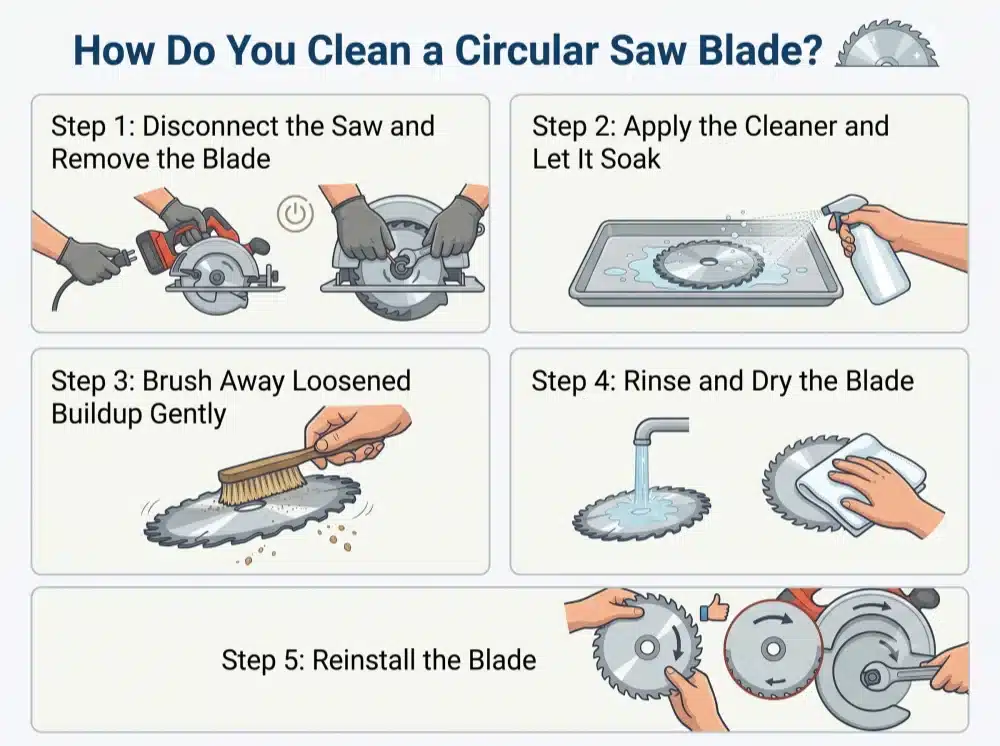
A blade can be brand new and still have problems. Teeth may be damaged during handling or installation, and visible warping is another reason to stop using it. Resin or other residue on the cutting edges can also increase friction.
Visible damage means the blade shouldn’t be used. Buildup is usually easier to deal with. You can clean the blade using a product recommended by its manufacturer and following the cleaning instructions.
Sometimes the blade checks out, but the saw still vibrates unusually or leaves rough cuts. That may point to an issue with the arbor, bearings, or another part of the saw. In that case, it’s better to have the machine inspected before using it again.
When the blade is properly installed and the saw runs normally, the next question is whether the blade is suited to the cut.
Is the New Blade Right for the Cut?
A new circular saw blade can burn wood if its tooth design and cutting characteristics don’t suit the job. A blade intended for crosscutting, for example, may not clear chips as efficiently during a long rip cut. A blade can also be unsuitable for the material or incompatible with the saw, even if it fits onto the arbor.
Match the Blade to the Type of Cut
Rip cuts follow the wood grain and produce long chips, so chip clearance is important. Crosscuts go across the grain and often benefit from a blade designed to leave a clean edge. A combination blade can handle both, but a blade designed specifically for the cut may perform better in demanding applications.
Tooth count is part of the decision, but more teeth don’t automatically mean a better cut. A blade with fewer teeth may offer more space for chip removal during ripping, while a higher-tooth-count blade may produce a smoother finish. Tooth geometry and the blade’s overall design matter just as much, so don’t choose by tooth count alone.
When burning occurs mainly during long rip cuts, especially when the saw struggles to clear chips, a blade designed for ripping may be a better choice than a fine-tooth crosscut blade. If the blade is appropriate but the saw still struggles, look for excessive cutting resistance elsewhere.
Check Compatibility With Your Saw
The blade diameter and arbor size must match the saw’s specifications. Its rated speed must also be suitable for the machine, and the blade must be approved for the intended application. A blade that physically fits isn’t necessarily compatible.
If the blade is correct for the job, the next clue is how the saw moves through the wood.
Are You Pausing or Forcing the Cut?
A circular saw can leave burn marks when the blade slows down under load, lingers in one spot, or encounters excessive feed pressure. However, slow progress can also signal a blade problem or wood pinching the blade, so feed pressure is not always the root cause.
Look at When the Burning Starts
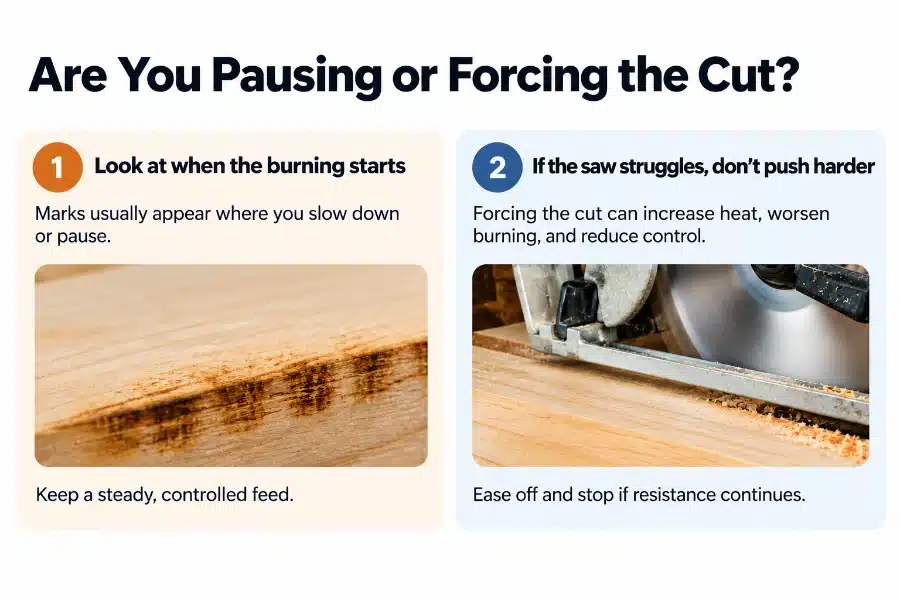
If the marks are concentrated where you slow down or pause, friction may be building up at those points. This is particularly noticeable during long cuts, where stopping and restarting can leave uneven marks along the cut surface.
Try to maintain a steady, controlled feed instead of repeatedly stopping and pushing forward. The right pace depends on the material, cutting depth, blade, and saw power. There is no single feed speed that works for every cut.
If the Saw Struggles, Don’t Push Harder
A saw that suddenly slows down or needs much more pressure than usual is telling you something has changed. Forcing it through can increase the load on the motor, worsen the burning, and make the saw harder to control.
Ease off and stop the saw if the resistance persists. Once the blade has stopped completely, disconnect power or remove the battery before checking for pinching, blade problems, or other obstructions. If nothing obvious explains the resistance, don’t resume cutting until the cause has been addressed.
If the saw moves steadily but the cut still burns, the blade may be rubbing against the sides of the kerf.
Is the Blade Rubbing Against the Side of the Cut?
A circular saw blade can burn wood even when its teeth are sharp if the blade plate or teeth rub against the sides of the cut, known as the kerf. This can happen when the saw twists during cutting or the blade enters the wood at an angle. Burn marks that are noticeably worse on one side can be a useful clue.
Check Whether the Saw Is Staying on the Cutting Line
When the saw drifts away from the intended line, trying to steer it sharply back while the blade is still in the wood can make the blade rub against the kerf. Keep the saw aligned with the cut instead of forcing it sideways. For a long, straight cut, a suitable straightedge or guide can help prevent the saw from drifting.
If the cut is consistently angled or the blade seems to rub even when the saw follows the line, check the saw’s setup.
Make Sure the Base Plate and Adjustments Are Secure
Take a look at how the saw sits on the wood. The base plate should rest flat against the surface, with the depth and bevel settings securely locked. A rocking base plate or a shifting bevel setting can cause the blade to move away from its intended angle.
Before inspecting the saw, disconnect it from power or remove its battery. Check for a bent base plate or loose adjustment locks, and correct any setup issues according to the manufacturer’s instructions. A blade that still appears misaligned after these checks may indicate a problem that needs professional attention rather than harder steering.
Everything looks properly aligned? The wood itself may be shifting or closing around the blade.
Is the Wood Pinching the Blade?
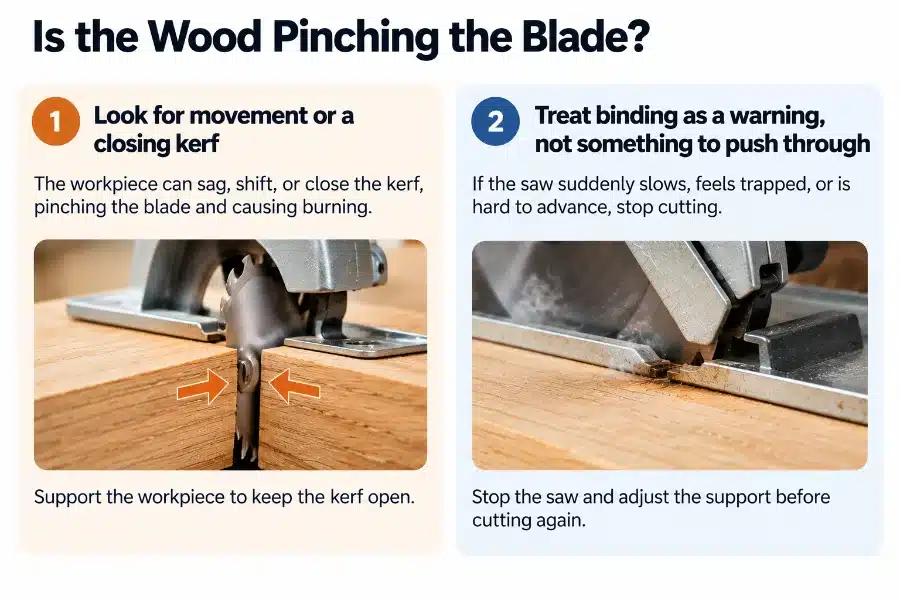
Wood can pinch a circular saw blade when the workpiece shifts, sags, or closes the kerf during cutting. The blade then has to push against the sides of the cut, increasing friction and potentially causing burning or sudden binding.
Look for Movement or a Closing Kerf
A long board may sag as the cut progresses. Wood can also contain internal stresses that cause the two sides of a rip cut to move toward each other. If the kerf starts closing behind the blade, the blade may become trapped even when the saw and blade are in good condition.
Support the workpiece so it cannot sag or shift as the cut progresses. For a long board, position the supports to prevent either side from dropping or twisting into the blade, while allowing the offcut to separate freely.
Treat Binding as a Warning, Not Something to Push Through
A saw that suddenly becomes difficult to advance, slows sharply, or feels trapped may be experiencing blade binding. Stop cutting rather than trying to force your way through. A blade caught in a closing kerf can cause kickback.
Follow the manufacturer’s procedure for stopping safely and wait until the blade has stopped completely. Disconnect power or remove the battery before adjusting the workpiece. Then reposition the supports to keep the kerf from closing around the blade, and make sure the wood is stable before trying again.
Repeated binding is a sign that something still needs attention. The support arrangement may be allowing the cut to close, or internal stresses in the wood may be contributing to the problem. Either way, don’t keep trying the same setup when the blade continues to bind.
When Should You Stop Cutting and Get the Saw Checked?
Burn marks alone don’t necessarily mean the saw is damaged. But persistent binding, unusual vibration, abnormal noise, or a blade that appears to wobble are reasons to stop and investigate before making another cut.
After the basic checks, consider the following:
- The blade is damaged or visibly warped: Stop using it and replace it with a suitable blade.
- The blade keeps binding despite proper workpiece support: Reassess the cutting setup. If the cause remains unclear, have the saw inspected.
- The saw vibrates, makes unusual noises, or appears to run unevenly: Don’t assume a new blade will solve the problem. The arbor, bearings, or other components may need attention.
- Burning continues after checking the blade, cutting technique, and workpiece support: Reassess the cutting conditions. If the saw also shows abnormal resistance, vibration, or noise, have it inspected.
If the saw behaves abnormally after these checks, keep it out of service until the problem has been resolved. Continuing to cut can damage the workpiece and may create a safety risk.
Conclusion
A new blade should make cutting easier, not leave you wondering why the wood is still burning. Before replacing it again, take a closer look at how the saw behaves during the cut and whether the blade, cutting path, and workpiece are all set up correctly. Often, finding the actual cause is more useful than trying another blade. If the saw continues to bind, vibrate, or behave unusually, stop using it until the problem has been checked.
FAQs About Circular Saw Burn Marks
Yes. Hardwood can create more cutting resistance, making an unsuitable blade or poor chip clearance more noticeable. Check that the blade suits the cut and that the saw moves through the wood without struggling.
Often, yes. Light burn marks can usually be sanded away if doing so won’t affect the finished dimensions. Deeper marks may require more sanding or a fresh cut, depending on how much material needs to be removed.
Not automatically. First, check that the blade suits the cut and is installed correctly, and rule out problems with the cutting path or workpiece support. Replace the blade if it is damaged or unsuitable for the job. If the saw continues to bind, vibrate, or make unusual noises, have it inspected before buying another blade.
Yes. Resin and other residue can increase friction, even on a relatively new blade. Clean any buildup with a product approved for the blade, following the manufacturer’s instructions. Disconnect power or remove the battery before handling or cleaning the blade.